
Portal
A portal from Emacs to the rest of the computer: native macOS views inside Emacs panes.
Overview
Portal is, as the name suggests, a portal from Emacs to the rest of the computer. It puts native macOS views inside Emacs panes, so a buffer can show a real web page or a real terminal as if it were ordinary buffer content.
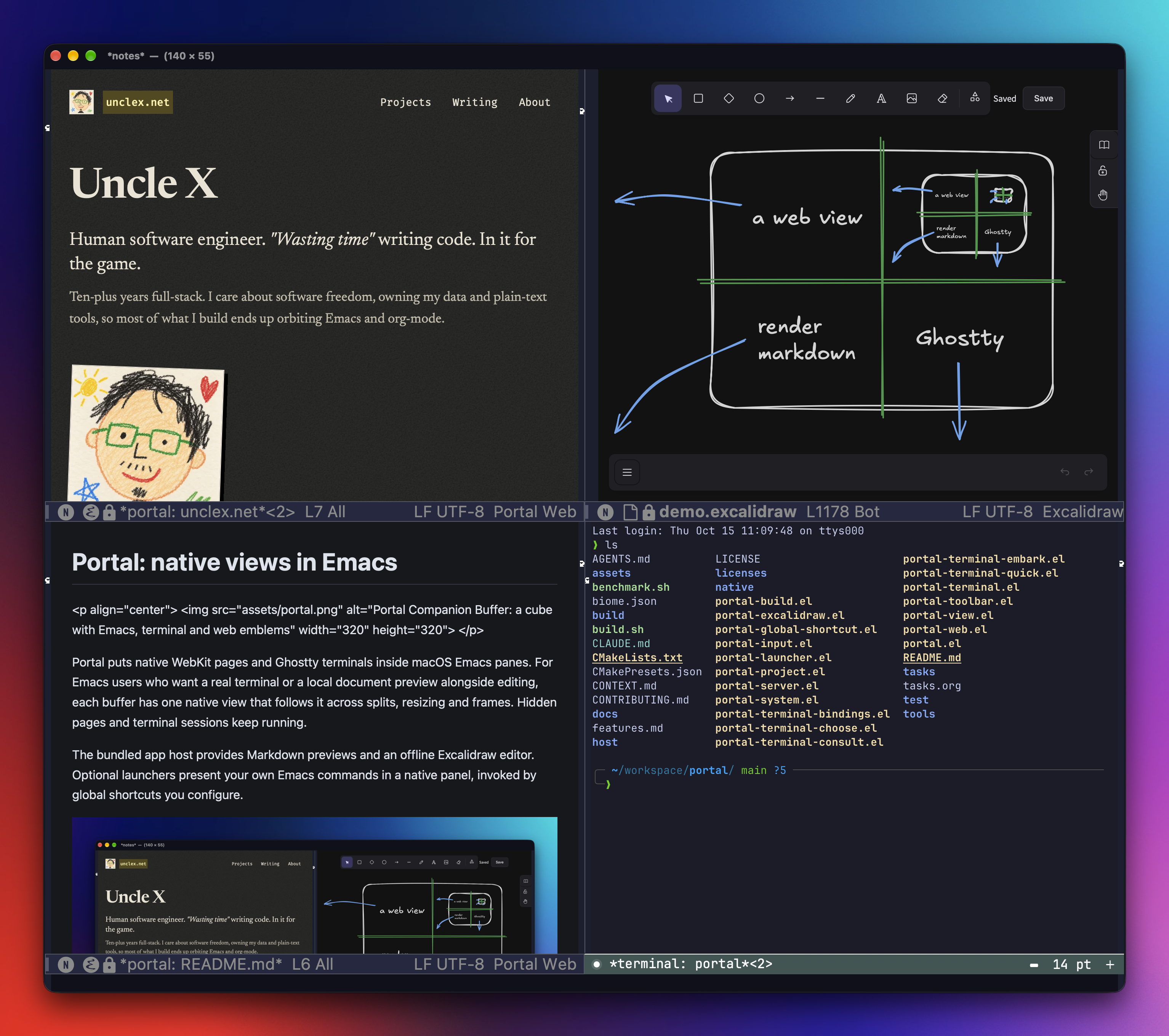
There are two kinds of view:
- Web view
- the system WebKit view, and with it everything the web can do.
- Terminal view
- a native Ghostty terminal.
That's it. Portal is a set of primitives. The things I built on top (Excalidraw, Markdown and HTML previews, quick terminals) are my preferences, and they're small on purpose. The primitives are the point: you can build your own things on them.
Why
I wanted to stay in Emacs. Emacs can't do everything a browser or a terminal app can, and the in-Emacs alternatives (xwidget-webkit, terminal emulators drawn with Emacs text) are slow or don't work well on macOS. Instead of bringing those things into Emacs text, Portal puts the real native views in the pane and lets Emacs manage them.
Install
Portal needs GNU Emacs 31.1 or newer, built for macOS's graphical NS interface with dynamic modules, plus Swift 6.2+ (Xcode), CMake and Ninja. Bun is optional; the build fetches a pinned one if you don't have it. Add it to your config:
(use-package portal
  :vc (:url "https://github.com/xiaoxinghu/portal" :rev :newest))
Then M-x portal-about. The first time, Portal offers to build its native part, which downloads a pinned GhosttyKit, so no Zig is needed. Run portal-about again once it's ready and you should see an animated portal in a native web view, with your Portal and Emacs versions. Click it or press RET to enter it, ⌘. to come back to Emacs. The install guide covers straight.el, building from a clone, and troubleshooting.
Views
Every view follows the same rules, whatever renders it:
- A buffer has at most one view. The view shows up in whichever pane displays the buffer, and follows it through splits, resizes and frames.
- Hiding the buffer hides the view; it doesn't stop it. Pages keep running, terminal sessions keep their processes. Killing the buffer closes it.
- The keyboard is handed over explicitly. Enter a view and it behaves like a macOS app; chords it doesn't use fall through to Emacs, and
⌘.gives the keyboard back.
Because the view belongs to a buffer, everything Emacs already does with buffers (display-buffer rules, consult-buffer, window layouts) works on web pages and terminals too.
Web View
The web view is the system WKWebView, the engine Safari uses. It loads any http, https, file or data URL:
(portal-open-url "https://example.com")
(portal-render-html "mockup.html")
(portal-render-markdown "PLAN.md")
Behind it is a small Bun server, the app host. Emacs starts it on demand, one per Emacs process, bound to localhost with a fresh access token. It ships as a standalone binary, so you don't need Bun or Node at runtime. Pages served by the app host are hosted apps, and they get a bridge to their buffer: the page posts JSON with window.portalBridge.postMessage, Emacs receives it as plists, and portal-web-send sends messages back. A web UI can talk to Emacs directly, without a server of its own.
What I built on top of it:
- Excalidraw
- offline, editing
.excalidrawfiles. Emacs owns opening and saving; the drawing is just a buffer. - Markdown preview
- rendered by the app host, with a table of contents and an Open in Emacs button. Agents write a lot of Markdown with tables, and a web view reads them better than any Markdown mode I've tried.
- HTML preview
- any local HTML file, next to the code. Agents hand me mockups as single HTML files, often interactive, and I don't need the browser to look at them.
Terminal View
The terminal view is Ghostty, through GhosttyKit, rendered natively in the pane. Emacs doesn't draw a single character of it, which is why it feels like Ghostty and not like a terminal emulated inside Emacs.
The primitive is just "a Ghostty terminal in a buffer". From Lisp you can run any program in one:
(portal-terminal-start (expand-file-name "~/code/site") "claude" '())What I built on top of it: portal-terminal for a shell in the current pane, terminals grouped by project, a quick scratch terminal per project in a panel at the bottom of the frame, Consult and Embark integration, and themes set from Elisp.
Limitations
- macOS only, verified on Apple Silicon with macOS 27. The native side is a C core over a Swift backend; the core is written so another platform (GTK, maybe) could implement the same primitives, but none does today.
- The module runs inside the Emacs process. A bug in it can crash Emacs, so try it in
emacs -Qfirst, and restart Emacs after rebuilding a module it has already loaded. - Hosted apps keep no cookies or storage between sessions, and never leave the app host. Other sites open in the default browser.
Backlinks2
The bridge between macOS and Emacs world via callback URL.