
M-x
The bridge between macOS and Emacs world via callback URL.
Overview
M-x is a macOS utility ecosystem that makes Emacs a system-wide automation backend. The name mirrors Emacs' own M-x command—the universal entry point for running anything. The project bridges macOS and Emacs so you can trigger arbitrary Elisp from anywhere on your desktop. It is a UI-less menubar app.
Installation
brew tap xiaoxinghu/tools
brew install --cask m-x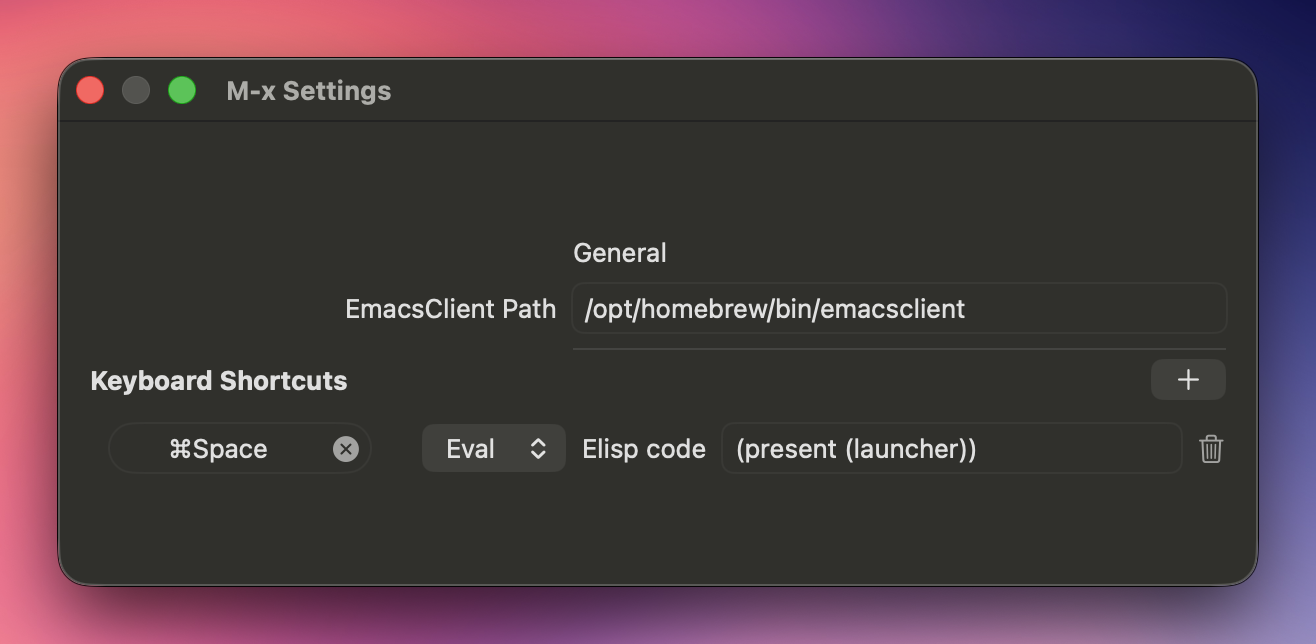
Why
It is always a struggle to let anything outside of Emacs to talk to it in macOS. The only way to properly commands it is via emacsclient. Which is great, but too unixy for macOS. So this app is an attempt to fill the gap.
The App
M-x.app is a menu bar utility with no Dock presence. It registers two URL schemes:
emacs://— for eval and open commandsorg-protocol://— passed through directly toemacsclient
When a URL arrives, two actions are supported:
- Eval: =emacs://eval?expr=(some-elisp)= →
emacsclient -e '(some-elisp)' - Open: =emacs://open?file=/path/to/file= →
emacsclient -n /path/to/file
Eval actions can also reference .el files instead of inline code.
The app also manages global keyboard shortcuts. Each shortcut maps to an eval or open command and persists across restarts.
Browser Extension (WIP)
A Chrome/Firefox extension. It opens a fuzzy-searchable command palette (Cmd+Shift+E by default) listing configured actions—name and Elisp code pairs. Selecting an action fires an emacs://eval URL, which M-x.app picks up and forwards to emacsclient. Actions are managed in an options page and stored in the browser's local storage.
What You Can Do With It
- Run any Emacs command from the browser without switching windows
- Bind global keyboard shortcuts to Elisp workflows
- Trigger
org-capturefrom anywhere via a floating frame on your current monitor - Use macOS Shortcuts or scripts to drive Emacs with `open "emacs://eval?expr\=..."`
- ... the sky is the limit.
Backlinks5
A portal from Emacs to the rest of the computer: native macOS views inside Emacs panes.